 Formwire
Send visitors to your own thank-you page
A plain HTML form leaves the page when it submits. Set a redirect and the visitor lands on your own thank-you page; leave it empty and they see ours. JavaScript callers get a JSON answer and stay put.
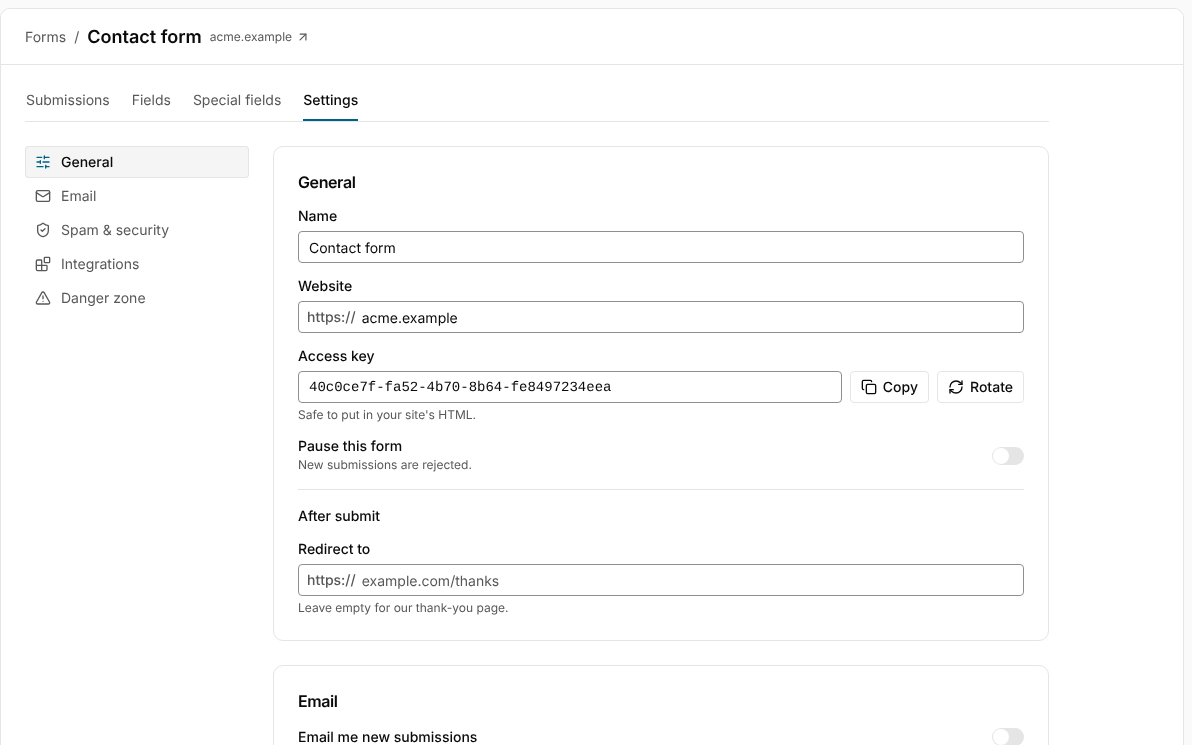
One setting or one hidden field
Set Redirect to in the form's settings for every page the form lives on, or add a hidden redirect field when each page has its own thank-you page. The field wins when both are set.
- Redirects are checked against the form's allowed domains; anything else falls back to our thank-you page.
- Errors redirect too, to a page that says what went wrong.
JSON for fetch
Post with fetch and an Accept: application/json header and Formwire answers with JSON instead of redirecting. Your page shows its own success state and the visitor never leaves.
A thank-you page without one
No redirect set? Visitors see Formwire's own success page, with your own heading and message, so a brand-new form works before you've built anything else.
Set the redirect
A hidden field in the form, or one setting for the whole form.
- 1
Open the form's General settings and fill in Redirect to, or add a hidden redirect input to the page.
- 2
Use a full URL with https.
- 3
Post the form. Formwire answers 303 to your URL after the submission is stored.
- 4
For a fetch-based form, send Accept: application/json and read success from the response instead.
<form action="https://formwire.io/submit" method="POST">
  <input type="hidden" name="access_key" value="YOUR_ACCESS_KEY">
  <input type="hidden" name="redirect" value="https://acme.com/thanks">
  …
</form>

<!-- or, with fetch -->
<script>
fetch("https://formwire.io/submit", {
  method: "POST",
  headers: { "Content-Type": "application/json", Accept: "application/json" },
  body: JSON.stringify({ access_key: "YOUR_ACCESS_KEY", email, message }),
}).then((r) => r.json()); // { success: true, data: { submission_id } }
</script>Questions about redirects
Can I redirect to a page on another domain?
Yes. Add that domain to the form's allowed domains and any https URL on it works. Redirects anywhere else fall back to our thank-you page, so nobody can use your form to send visitors to a stranger's site.
What does the visitor see if something goes wrong?
A plain error page from Formwire that names the problem, such as a missing access key or a paused form. Fetch callers get the same information as JSON.
Can I pass the submission to the thank-you page?
The redirect is a plain 303 with no data appended. Use fetch and the JSON response if your thank-you page needs the submission's id.
Goes well with
-
Autoresponder
Email the person who filled in your form with a subject and message you write, filled in from their submission with {field:name} placeholders.
-
Spam protection
A hidden honeypot field, a content filter and per-form rate limits run on every Formwire form. Add a captcha, blocked words and allowed domains when you want more.
-
Submission inbox
A dashboard inbox for each form with search, folders, bulk actions, CSV export and a read API, so you never dig through email to find a submission.